Choose which emails your tenant gets — and a written notice when you schedule an inspection
Under Emails to the tenant, each kind of email LetSorted sends a tenant can now be switched off on its own. When you schedule an inspection, LetSorted emails your tenant a written notice of the visit and records when and to whom it was sent.
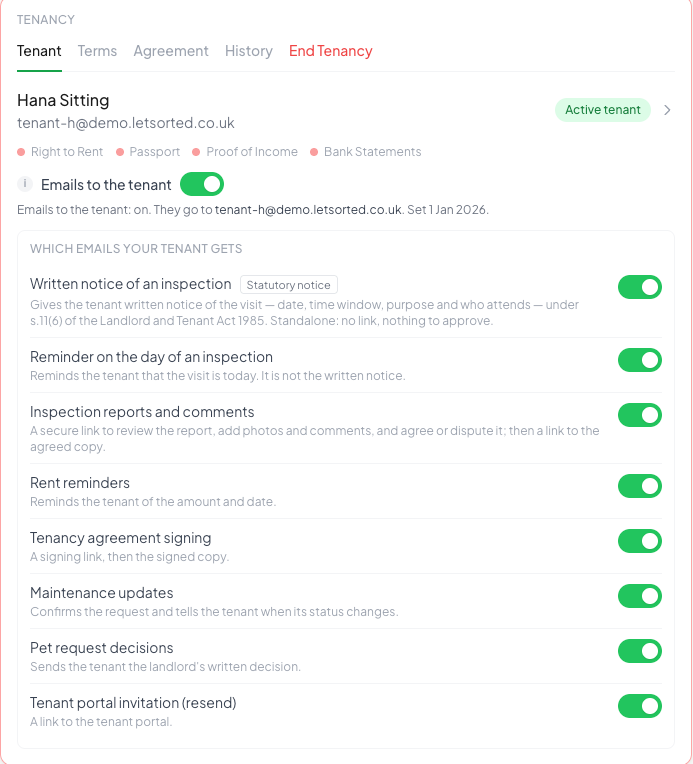
Emails to the tenant still decides whether LetSorted emails a tenant at all. Under it, each tenancy now lists every email LetSorted can send that tenant, and each can be switched off on its own:
- Written notice of an inspection
- Reminder on the day of an inspection
- Inspection reports and comments
- Rent reminders
- Tenancy agreement signing
- Maintenance updates
- Pet request decisions
- Tenant portal invitation (resend)
Every one of them is on unless you switch it off, so nothing changes for the emails your tenants already get.
The written notice of an inspection
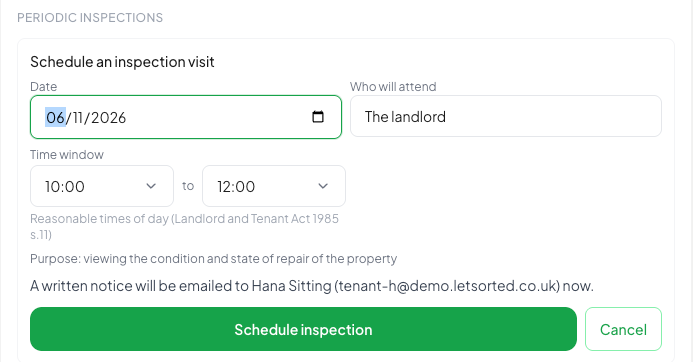
When you schedule an inspection visit, LetSorted emails your tenant a written notice stating the date, the time window, the purpose and who will attend, and quoting section 11(6) of the Landlord and Tenant Act 1985, which provides for entry "on giving 24 hours' notice in writing to the occupier". The notice has no link and asks the tenant for nothing. The inspection records when it was sent, to whom, and the text that was sent.
It is on wherever emails to the tenant are on, from the first inspection you schedule; nothing is sent about inspections already booked. Before you confirm a visit, the screen says whether a notice will be emailed now. If the visit is less than 24 hours away, it warns you, and does not stop you.
Where LetSorted does not send it — emails to the tenant are off, or you have switched the notice off — the inspection says "Notice not sent by LetSorted — serve it yourself and record the date", and keeps the date you enter as your own record.
Switching an email off
Open the property, then the tenant's tenancy. Under Emails to the tenant, switch off the email you do not want LetSorted to send. The change applies to that tenancy only.
Found this useful? Share with other landlords: